

Sometimes when creating WeChat Official Account menus, you may want to add a quick link to the article list of a WeChat Official Account. How to obtain it?
The article list page link of a WeChat Official Account is generally not directly accessible, because the WeChat Official Account platform does not provide an official API to directly retrieve the full article list of a specific account.
The article list page link of a WeChat Official Account looks similar to the following:
https://mp.weixin.qq.com/mp/profile_ext?action=home&__biz=MzIxNDMxNzUxNg==#wechat_redirect
Among them, the parameter __biz=MzIxNDMxNzUxNg== corresponds to the specific Official Account ID (Biz ID). This is a parameter generated by WeChat officially to identify the Official Account.
How to obtain the Biz ID of a specific Official Account
If you want to obtain the __biz parameter of a specific Official Account, you can use the following method:
Obtain it from the article URL of the Official Account. Simply open any article from the Official Account, as shown below:
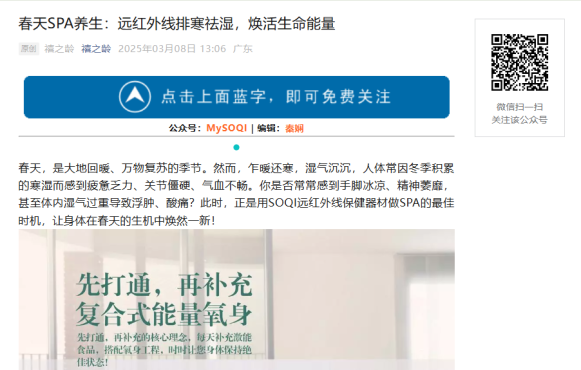
Then right-click on the QR code on the right side, and copy the QR code image link as follows:
https://mp.weixin.qq.com/mp/qrcode?scene=10000004&size=102&__biz=MzIzMjU1ODkxNg==&mid=2247485998&idx=1&sn=a2ebf3807b09439fbbd45631f46a44ec&send_time=
This way, you can find the Biz ID we need from this link: biz=MzIzMjU1ODkxNg
Then replace it in the link below:
https://mp.weixin.qq.com/mp/profile_ext?action=home&__biz=MzIxNDMxNzUxNg==#wechat_redirect
That's it!







 1
1



